Travel Medication Planner
The Travel Medication Planner helps you plan around journeys, time-zone changes, and disrupted routines. It uses the medicine schedules already stored in Dosewise and the journey details you enter.
The planner is a planning aid. It is not medical advice and does not replace medicine instructions or professional guidance.
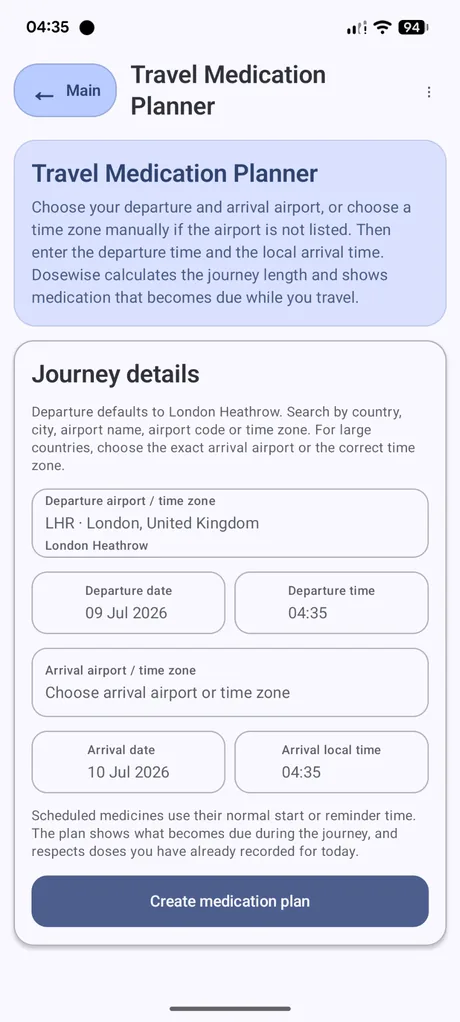
Journey details
- Open the three-dot menu.
- Select Travel Medication Planner.
- Choose a departure airport or time zone.
- Enter the departure date and time.
- Choose an arrival airport or time zone.
- Enter the arrival date and local arrival time.
- Select Create medication plan.
How Dosewise uses the journey
Dosewise calculates the journey length from the departure and arrival details. It then shows medicines that become due during the journey, based on the schedules and records already stored in the app.
Scheduled medicines use their normal start or reminder time. The plan also respects doses already recorded for the day.
Time zones and limits
For large countries, choose the exact arrival airport or correct time zone. A city, airport, or time-zone mismatch can change the calculated journey window.
Travel days can involve delays, sleep changes, missed meals, security rules, or medicine storage requirements. Dosewise does not handle every travel condition. Check your medicine instructions and travel guidance before you leave.
Travel packing list
The app menu also includes a Travel packing list. Use it to prepare a simple list of medicines and related items for a trip.