Reminders and settings
Use settings to control schedule start time, reminder timing, vibration defaults, and text size.
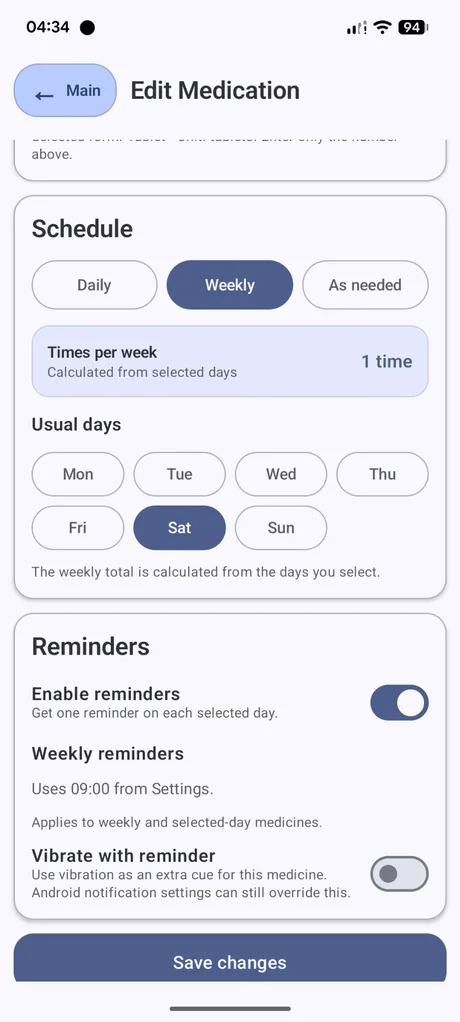
Reminder settings for each medicine
Each medicine can have reminders enabled or disabled. You can also set whether that medicine should vibrate with its reminder.
Existing medicines keep their own reminder settings when you change the default vibration setting for new medicines.
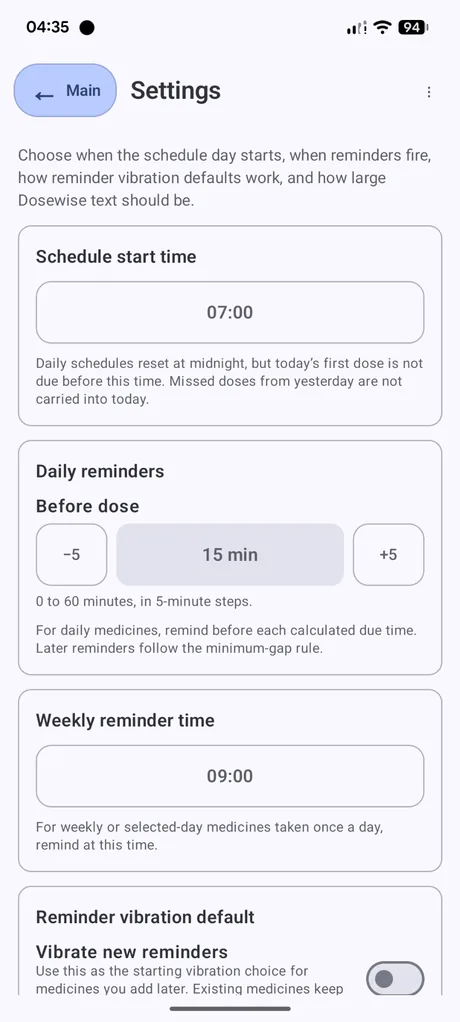
Global settings
Schedule start time
Sets when the first daily dose should become due. Daily schedules reset at midnight, but the first dose is not due before this time.
Daily reminders
Sets how many minutes before a calculated daily due time Dosewise should remind you. The app uses 5-minute steps within the supported range.
Weekly reminder time
Sets the reminder time for weekly or selected-day medicines that are taken once on their selected day.
Reminder vibration default
Sets the starting vibration choice for medicines you add later.
Display size
Changes the Dosewise text size. This works alongside your Android font-size setting.
Android notification settings
Dosewise uses Android notifications for reminders. Android can still block or limit notifications through system settings, battery settings, focus modes, do-not-disturb settings, or per-app notification permissions.
If reminders do not appear, check Android notification permissions for Dosewise as well as the reminder settings inside the app.
After changing settings
When you save reminder settings, Dosewise refreshes active reminder alarms using the new settings.