Now and Today
Use Now for immediate actions. Use Today to see the wider daily timeline.
Now
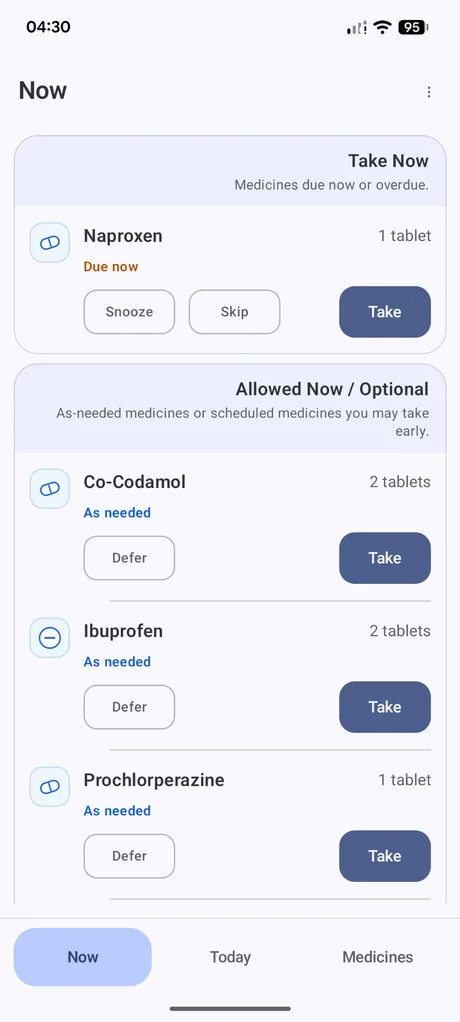
The Now screen has two main areas.
Take Now
Shows scheduled medicines that are due now or overdue. These are the medicines that need attention under the rules set in Dosewise.
Allowed Now / Optional
Shows as-needed medicines and scheduled medicines that may be taken early under the app rules.
If nothing is due, the Take Now area can show Nothing due.
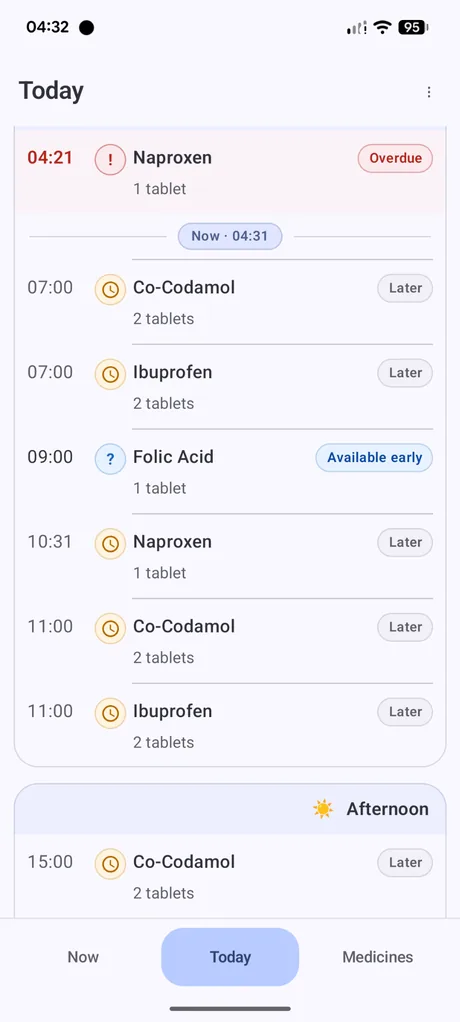
Today
The Today screen shows the day as a timeline. It can show medicines due earlier, medicines due later, and medicines that are available early.
The current time marker helps separate what has already passed from what is still ahead.
Common status labels
Due at the current time.
The due time has passed without a resolving record.
Due later in the day.
May be recorded before the scheduled due time.
The medicine is kept in the app but is not active.
Schedule start time
The schedule start time in Settings controls when the first daily dose should become due. Daily schedules reset at midnight, but Dosewise does not make the first dose due before the schedule start time.
Missed doses from yesterday are not carried into today.