Getting started with Dosewise
Dosewise is a medicine timing and dose logging app for Android. It helps you record when you take a medicine, see what is due, and keep a history of recent dose records.
Dosewise is useful when you want a clear record of routine medicines, weekly medicines, occasional medicines, or medicines where spacing between doses matters.
Dosewise does not replace medical advice. Use the schedule, dose, and timing instructions given by your clinician, pharmacist, prescription label, or medicine leaflet.
The main screens
Now
Shows medicines that are due now or overdue. It also shows medicines that are allowed now or optional, such as as-needed medicines.
Today
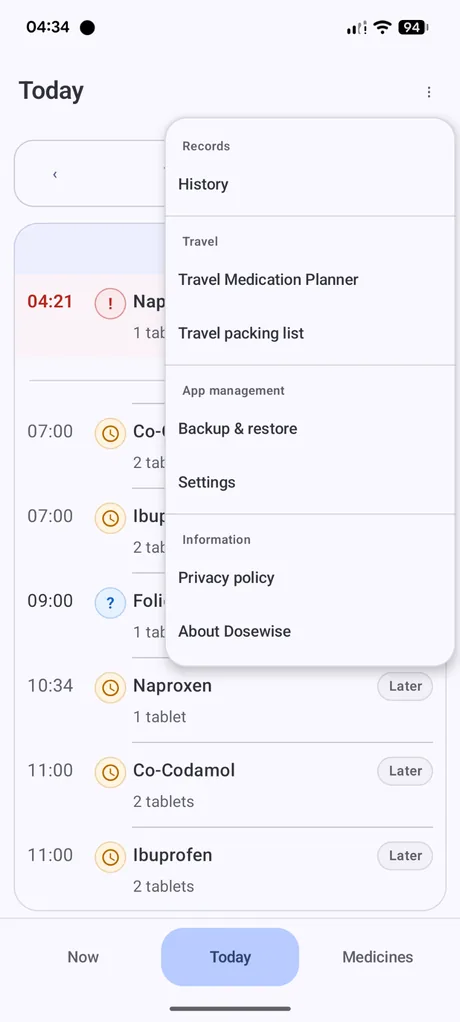
Shows the day as a timeline, including due times, later doses, overdue items, and medicines available early.
Medicines
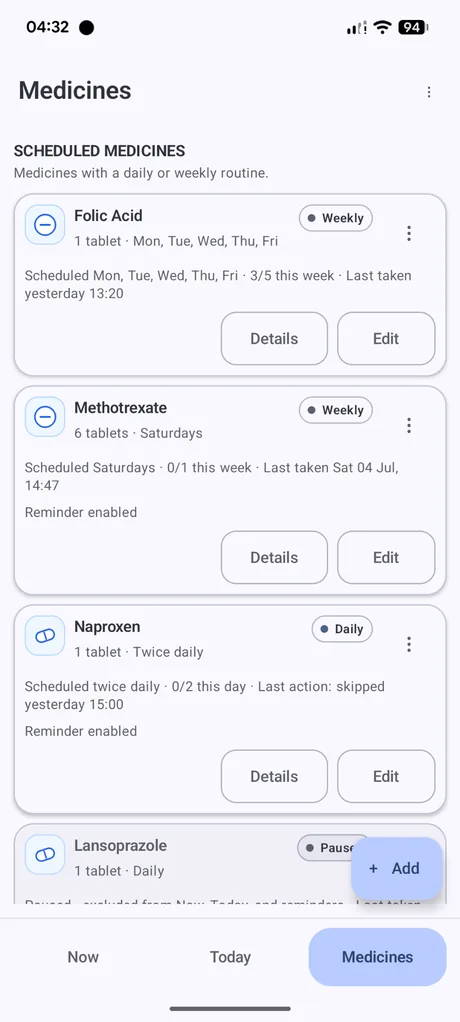
Shows the medicines you have added, their schedule type, dose, taken count, last action, and reminder status.
Add your first medicine
- Open the Medicines screen.
- Select Add.
- Enter the medicine name and, if useful, the strength.
- Choose the medicine form and icon. These help you recognise the medicine in lists.
- Choose the schedule type: daily, weekly, or as needed.
- Set the dose amount and any reminder options you want to use.
- Save the medicine.
Scheduled and as-needed medicines
Scheduled medicines are medicines you expect to take on a routine. They can be daily, weekly, or selected days of the week.
As-needed medicines are medicines you do not take on a fixed routine. Dosewise can still record when you take them and apply spacing or limit rules based on the details you enter.
The app menu
Use the three-dot menu to open History, Travel Medication Planner, Travel packing list, Backup & restore, Settings, Privacy policy, and About Dosewise.